Archive for the ‘Symfony’ Category
Symfony Parallel Content Delivery – UPDATE
UPDATED – 05-19-2011
I updated the script to make sure that it serves the same image from the same domain on each request. It’s counter productive to send the same image from different url’s as this increases the download time. This fix does not hash or internally check the image to see if it is identical to another image with a different name. This also does not store anything in a file or database, so it’s possible that the image will be served from a different url on a different page / request.
This is a drop in replacement for the original script. The interface for cdn_image_url and cdn_image_tag methods did not change.
Original Information
In order to reduce page latency, I’ve been implementing a parallel content delivery network on a large symfony project. This code should work on symfony and most any other php based site. What it does is allow a developer to specify a number of subdomains / domains for content delivery, such as content1.mydomain, content2.mydomain, etc… When serving images in this manner, one can greatly reduce page loading time by using multiple domains for images even if the domains are on the same server.
This script uses a singleton hack to keep a cursor of the current domain that the image is being served from. It then delivers the image in sequential order from the list of domains that the developer has pre-specified. A developer can specify as many domains as they want, and if the page is being served over a secure connection, the script will automatically include secure versions of the images. NOTE: make sure the domains have ssl installed correctly or errors will occur.
Add this script to a file in /myproject/lib/.
<?php class Cdn { private $current_cdn; private $is_secure = 'http://'; private $prefix_match = array(); private static $instance; private static $domain = 'mydomain.com'; private static $cdn = array('www.', 'cd1.', 'cd2.'); private function __construct() { $this->current_cdn = 0; if ($_SERVER['SERVER_PORT'] == '443') { $this->is_secure = 'https://'; } } public function cdn_image_url($image_path) { $cdn = $this->get_cdn($image_path); return $this->is_secure . $cdn . self::$domain . '/' . $image_path; } public function cdn_image_tag($image_path, $option_array=array()) { $options = null; $cdn = $this->get_cdn($image_path); if (count($option_array) > 0) { foreach ($option_array as $key => $attribute) { $options .= $key . '="' . $attribute . '" '; } } return '<img src="' . $this->is_secure . $cdn . self::$domain . '/' . $image_path . '" ' . $options . ' />'; } private function get_cdn($image_path) { if (!isset(self::$cdn[$this->current_cdn])) { $this->current_cdn = 0; } if (array_key_exists($image_path, $this->prefix_match)) { $cdn = $this->prefix_match[$image_path]; } else { $cdn = self::$cdn[$this->current_cdn]; } $this->prefix_match[$image_path] = $cdn; $this->current_cdn++; return $cdn; } public static function getInstance() { if(self::$instance == NULL) self::$instance = new Cdn; return self::$instance; } } |
Then you can call your images using 1 of 2 methods throughout the project and they will be delivered sequentially through all of the domains in your CDN.
If you would just like the image url:
$my_url = Cdn::getInstance()->cdn_image_url('images/my_image.jpg'); |
If you want the entire tag:
echo Cdn::getInstance()->cdn_image_tag('images/swiped-box-b.jpg'); |
You can also add attributes to the tag:
echo Cdn::getInstance()->cdn_image_tag('images/swiped-box-b.jpg', array('alt' => 'My Image')); |
If your images are hosted on completely different domains, simply edit the $cdn property to include the full domain, and take out the self::$domain property from the appropriate method: cdn_image_url or cdn_image_tag.
This is a very basic class for delivering images from different domains. It does not take things into account like serving the same image from the same domain every time to take advantage of caching, or checking to see if the image actually exists. However, it should provide a basis for a more complete content delivery script.
When do you have too much code?
I was integrating a symfony project with Paypal’s Express checkout system last week. Having not messed with this API in several years, I went to Paypal’s site and downloaded their SOAP PHP SDK for integrating with their API. Their scripts work marginally out of the box albeit with terrible documentation. Many classes and functions have zero documentation. Some features of their API have no documentation at all. Anyway, with a little work most people can get a basic working integration with Paypal using their SDK.
In trying to implement several advanced features and callbacks, sifting through hundreds of classes and files in their SDK, I decided that I needed to write my own class. Starting from scratch, I came up with a bare-bones class integrating with the Express checkout API. I completely dumped Paypal’s SOAP implementation in favor of the much simpler NVP (name-value-pair) integration. I don’t see any reason to stick with SOAP on such a simple API. I did include the more advanced features like adding products and shipping (this was probably in Paypal’s, but I couldn’t find it), and shipping and tax callbacks, through the express checkout API. After about 8 hours of coding and testing, I had a working integration that consisted of a handful of files, and about 400 overly spaced lines of code.
I went back and parsed out Paypal’s SDK to see just how large this monster was, and it is over 190,000 lines of code, and just under 1000 individual files.
I had looked at 2 symfony plugins the PaypalDirect and PrestsPaypal plugin, and the both use a lightly stripped version of Paypal’s SDK.
So the point of this is, don’t trust some plugin or package, or script from me, from Paypal, from Symfony, or any provider unless you know it is the best or at least a reasonable way to accomplish your task. Even if the code is cached, the overhead on running 190,000 lines of code every time a customer checks out of your website is simply ridiculous when you can accomplish the same thing with a few hundred. Additionally if you take into account the potential for errors, memory leaks, and security problems with 190,000 lines of code vs. 400, there’s really no comparison.
Now there are times when a huge SOAP integration would be appropriate, but I can’t see how this could possibly be one of those. I also think that if a good programmer started from scratch rather than using Paypal’s bloated code, they could significantly reduce the size of their integration. It’s absolutely baffling trying to debug or get information on a PHP class or method, when there’s 1000 files that you need to hop through to find the piece of code you’re looking for.
Google chart over HTTPS/SSL
The google charts API does not support the https protocol. If your website is being delivered through a secure connection, the chart will cause a SSL error. Here’s a quick way to deliver google chart images over ssl.
To start off with, the chart image must be delivered from a secure connection. Google doesn’t allow this plain and simple, so we need to figure out how to host it from our own site. We accomplish this by fetching the image from google using the standard API, writing it to a file, and then calling it on our own script. We basically make a image handling proxy.
Let’s take a simple google chart to experiment with.
$chart_image = 'http://chart.apis.google.com/chart?chs=500x50&chf=bg,s,ffffff&cht=ls&chd=t:23.52,20.58,26.47,23.52,23.52,23.52,100.00,0.00,23.52,23.52,27.94,20.58,23.52&chco=0066ff'; |
Next we need to make a function to fetch and save the google chart locally. It will check the chart against the local copy and save it if the chart doesn’t exist, or the image has changed. This way we aren’t re-writing the same chart on every request, but if the chart changes, it will be updated appropriately.
public static function saveImage($chart_url,$path,$file_name){ if(!file_exists($path.$file_name) || (md5_file($path.$file_name) != md5_file($chart_url))) { file_put_contents($path.$file_name,file_get_contents($chart_url)); } return $file_name; } |
Lastly we tie it all together so that it is usable in our application. Im using this within a class, but this could just be used as a function as well. Your image directory will need to be writable for this to work.
public function doSomething() { $local_image_path = '/path/to/images/charts/'; $image_name = 'some_chart_image.png'; $chart_url = 'http://chart.apis.google.com/chart?chs=500x50&chf=bg,s,ffffff&cht=ls&chd=t:23.52,20.58,26.47,23.52,23.52,23.52,100.00,0.00,23.52,23.52,27.94,20.58,23.52&chco=0066ff'; $image = self::saveImage($chart_url ,$local_image_path,$image_name); } |
You’ll need to implement your own error handling, and adjust this to meet the paths and specifics of your server, but the image can now be called from:
<img src="/images/charts/some_chart_image.png" alt="" />
If you need help creating your base chart image, this tool is a great place to start.
Symfony 1.2 redirect specific modules and actions to HTTPS (SSL)
Post Symfony 1.1, the sfSslRequirementPlugin will no longer work.
Having needed a way to force a SSL connection for certain pages, I modified a few scripts that I found online, and created a very simple filter to handle this. This was inspired by this script, and the unacceptably poor example in the Symfony 1.2 book.
To start off with, we need to modify our app.yml file to specify what modules and/or actions need to be secure. Leave the action completely blank if you want the entire module secure. Also change ignore_non_secure to true if you don’t care if non specified pages are server over a ssl connection. Basically, from the app.yml below, setting this to false, will redirect any module/action to the non-secure version if it is not specifically defined under secure_actions. Setting it to true will allow a user to request any page over https, even if it is not listed in app.yml. Let me know if this is confusing in any way.
//app.yml all: ssl: ignore_non_secure: false secure_actions: - { module: shopping_cart} - { module: services action: apply} |
Next we add this filter. Save this under MyProject/apps/MyApp/lib/sfSslFilter.php
<?php class sslFilter extends sfFilter { /** * Execute filter * * @param FilterChain $filterChain The symfony filter chain */ public function execute ($filterChain) { $context = $this->getContext(); $request = $context->getRequest(); $ssl_actions = sfConfig::get('app_ssl_secure_actions'); $allow_ssl = sfConfig::get('app_ssl_ignore_non_secure'); if (!$request->isSecure()) { //Redirect to the Secure Url //If the module and/or action match $ssl_actions set in app.yml foreach($ssl_actions as $action) { if($action['module'] == $context->getModuleName() && !$action['action']){ //The entire module needs to be secure //Redired no matter what the action is. $secure_url = str_replace('http', 'https', $request->getUri()); return $context->getController()->redirect($secure_url, 0 , 301); } else if($action['module'] == $context->getModuleName() && $action['action'] == $context->getActionName()) { //Redirect if the module and action need to be secure $secure_url = str_replace('http', 'https', $request->getUri()); return $context->getController()->redirect($secure_url, 0 , 301); } } } else if($request->isSecure() && !$allow_ssl) { $redirect = true; //Redirect to the Non-Secure Url //If the module and/or action are not in $ssl_actions set in app.yml foreach($ssl_actions as $action) { if(($action['module'] == $context->getModuleName() && !$action['action']) || ($action['module'] == $context->getModuleName() && $action['action'] == $context->getActionName())) { $redirect = false; } } if($redirect) { $non_secure_url = str_replace('https', 'http', $request->getUri()); return $context->getController()->redirect($non_secure_url, 0 , 301); } } $filterChain->execute(); } } |
Finally, add to the MyProject/apps/MyApp/config/filters.yml file:
sslFilter: class: sslFilter |
Clear the cache (symfony cc), and there you have it. Let me know if you have a better or different way of dealing with this on a per-module or per-action basis. Hopefully sfSslRequirementPlugin will get ported to work with Symfony 1.2, as the method above will not alter routes on your application.
Additionally, I specifically used 301 redirects to make this more search engine friendly, in case Google or another bot gets on a ssl page. This will help prevent getting duplicate pages indexed due to http and https versions of the same page.
Symfony and Modalbox
ModalBox is a cool inline-popup script that can be used to create interactive Web 2.0 dialogs. Modalbox uses the Prototype javascript framework, which is coincidentally the same that Symfony uses for its included Javascript and Ajax functions.
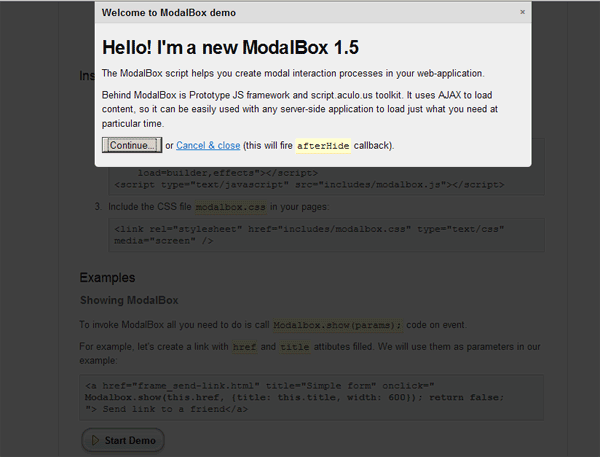
Unfortunately Modalbox uses a more recent version of Prototype, and there is no track on when we can expect Symfony to upgrade it’s included version of Prototype. However, this doesn’t prevent us from using Modalbox in a Symfony development. We do have to trick symfony into using the correct Propel version for us. Once Symfony updates their Prototype version, using modalbox should become substantially easier.
To start out we need to download modalbox, and upload the newer prototype, scriptaculous, and modalbox.js scripts to our web/js directory.
Querying with Propel Criteria using “NOT IN” (criteria::not_in)
It’s fairly common to use “NOT IN” database queries in web development.
Symfony when using Propel does not have native support for using NOT IN queries in reference to another tables. You can use NOT IN and an array, but cannot use NOT IN with reference to another table.
Here’s how to use NOT IN other_table with Propel and Symfony. Let’s pretend we need to run this query.
SELECT * FROM my_table_1 WHERE id NOT IN (

SELECT id FROM my_table_2);
Using Propel and Criteria, there is no native way of running this query. But, with the Criteria::CUSTOM modifier, we can force this query through propel.
It’s actually very easy.
$c = new Criteria; /* Example query $not_in_query = 'my_table_1.id NOT IN ( SELECT id FROM my_table_2)'; */ $not_in_query = '%s NOT IN ( SELECT %s FROM %s)'; $not_in_query = sprintf( $not_in_query, MyTable1Peer::ID, MyTable2Peer::ID, MyTable2Peer::TABLE_NAME ); $c->add(MyTable1Peer::ID, $not_in_query, Criteria::CUSTOM); $result = MyTable1Peer::doSelect($c); |
You can add whatever other Criteria to the query as well. So far this is the only reliable way to run these sort of queries that I’ve found.